Configurix

Industrial equipment configurator and visual CPQ for manufacturers

Configure complex equipment from application requirement to accepted order.

Configurix connects requirements, governed product rules, modular 3D layouts, account pricing, proposals, approvals and optional configured-order data in one traceable industrial sales project—without presenting visual configuration as automatic engineering approval.

Machinery, process skids, conveyors, packaged systems and production lines
Module, capacity, interface, material, control and accessory rules
Manufacturer, sales-engineer, distributor and customer workflows
Live account pricing, proposals and optional BOM or order handoff
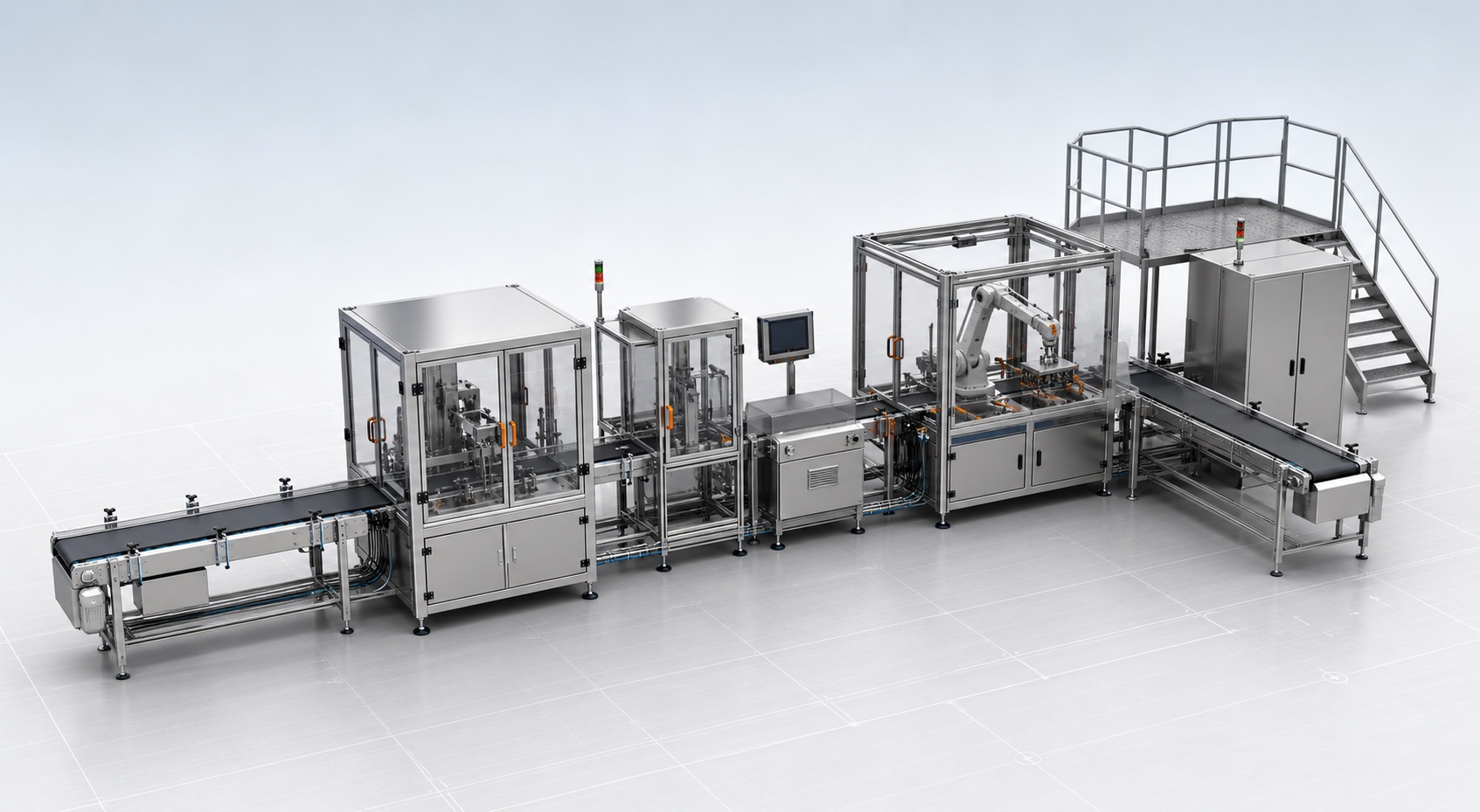
Modular industrial packaging and conveyor line with guarded machinery, robotic cell, control cabinet and service platform in a professional 3D configurator studio

One connected industrial project

Requirements, modules, layout, price, documents and review status stay connected.

Industrial configuration software defined

Selection, system configuration, visual CPQ and engineering are different layers.

Industrial equipment configuration begins with a governed catalogue and a defined application. The workflow can translate duty, throughput, materials, utilities, environment and site inputs into permitted product families, capacities, modules, motors, controls, guarding, accessories and services while preserving why each decision was made.

A modular 3D view makes the result understandable. Users can review machine arrangement, connected modules, overall footprint, access doors, platforms and service-clearance zones. That visual context supports sales and layout review, but does not independently verify process performance, structural loads, electrical design, functional safety, foundations or regulatory compliance.

Visual CPQ connects the accepted equipment configuration to account prices, discounts, freight, installation, commissioning, proposals, revisions and approvals. Manufacturers can govern one product model while sales offices, distributors, dealers and customers receive the catalogues, terms, languages and documents intended for them.

Configure-to-order options can follow accepted rules directly. Engineer-to-order exceptions can be identified early and routed with the exact input, preliminary layout and commercial context that engineering needs. Specialist calculations or CAD automation should only be presented as included when their methods, source data and acceptance tests are defined.

Model the industrial decisions that determine validity, price and handoff.

The implementation is built from the manufacturer's actual product structure, dependencies, prices, documents and review gates—not from a decorative 3D model or generic questionnaire.

Application and duty

Capture the inputs that the manufacturer really uses for selection.

  • Product or material handled, throughput, batch, flow, pressure, speed or duty
  • Utilities, electrical supply, ambient, hygiene, washdown and hazardous-area inputs
  • Footprint, access, site, service, survey and engineering-review status

Equipment and modules

Guide users through permitted machines, packages and connected systems.

  • Base machines, frames, vessels, pumps, conveyors, cells, skids and line modules
  • Capacity ranges, dynamic dimensions, connection points and sequence rules
  • Standard, optional, custom, unavailable and lifecycle-controlled products

Options and dependencies

Keep mechanical, electrical and commercial selections coherent.

  • Motors, drives, controls, sensors, networks and electrical packages
  • Materials, seals, guarding, doors, platforms, finishes and environmental packages
  • Required accessories, exclusions, quantities and market-specific variants

3D layout and review

Communicate the selected equipment and intended arrangement.

  • Module order, machine footprint, heights, interfaces and connected equipment
  • Access doors, operator zones, service clearances, guarding and platforms
  • Customer-facing views, layout review and clearly labelled engineering conditions

Pricing and channel control

Use one governed configuration across direct and channel sales.

  • Website, internal sales, distributor, dealer and authenticated customer journeys
  • Equipment, options, freight, installation, commissioning, training and service prices
  • Account catalogues, discounts, margins, currencies, taxes and approval permissions

Documents and order data

Preserve the accepted project beyond the sales interface.

  • Proposals, specifications, layouts, assumptions, exclusions and revision history
  • Optional configurable BOM, routing, configured-order or engineering-review payload
  • CRM, ERP, PIM, PLM, CAD, ecommerce, API and webhook connections

One connected process

From application requirement to a reviewable industrial offer.

Sales, distributor and engineering teams can continue from the same versioned project while the interface distinguishes selected, calculated, visual, custom and review-required information.

Define the application

Capture requirements and accepted inputs

Record the duty, environment, utilities, site constraints and commercial context used to begin selection.

Configure the system

Assemble permitted equipment and modules

Apply product, capacity, interface, sequence, option and market rules to the project.

Create the offer

Calculate price and assemble documents

Use authorised account terms and continue into a proposal, specification or preliminary layout.

Review and hand off

Preserve versions, approvals and outputs

Route custom or technical conditions before sending accepted configuration and commercial data downstream.

A product selector returns a part number. Connected industrial CPQ preserves the whole configured system.

Manufacturers should test application inputs, modular dependencies, channel pricing, revisions and downstream data while keeping engineering boundaries explicit.

RequirementConfigurix industrial implementationGeneric selector or 3D viewer
Application and provenanceRequirements, source, catalogue version and selection inputs can remain attached to the saved project.May return a product code without preserving the complete technical and commercial context.
System structure and dependenciesModules, interfaces, quantities, controls, accessories and market availability can follow governed rules.Often filters products or changes visible options without modelling a multi-level system.
Engineering boundariesSelected, calculated, visual, custom and review-required information can be labelled and routed appropriately.May blur an indicative match or layout with process, mechanical, electrical or safety approval.
Account pricing and approvalsThe same system can use customer catalogues, prices, discounts, margins and approval levels.Commercial terms are commonly applied later in a spreadsheet, CRM or separate quoting tool.
Proposal and order continuationAccepted modules, options, price, documents and review status can continue into defined downstream systems.Usually ends with a model, image or report that another team must reconstruct.

Industrial equipment configurator and CPQ FAQ

Detailed answers for machinery and equipment manufacturers.

Configure-to-order, engineered systems, modular lines, live pricing, proposals, BOM, ERP, PLM and engineering boundaries.

See the working system

Book a demo. See Configurix live.

A free, no-obligation walkthrough tailored to how your team configures, quotes and delivers.

Book a demo
Illustrative Configurix product guide wearing a branded T-shirt

Talk through your catalog, rules and sales flow with us.